
How the Google Maps Identity Update Affects Your Google Business Profile Reviews
Key Takeaways
- Google launched a custom posting identity feature in November 2025, allowing reviewers to use a display name instead of their real name.
- This is pseudonymity, not true anonymity. Google still knows who the reviewer is, even if the public doesn’t.
- Alias reviews count the same as real-name reviews for local search rankings and your Google Business Profile rating.
- For privacy-sensitive industries, such as healthcare, legal, and counselling, this update is likely to increase the volume of reviews your business receives.
- Proactive reputation management matters more now; more candid reviews mean your response strategy needs to be ready.
Anonymous Reviews on Google: Is it Really Anonymous?
If you’ve heard that Google now allows anonymous reviews, you’re not alone. 
This update has been making waves, especially among industries where privacy matters most, like counselling, healthcare, and legal services.
But here’s the truth:
Google didn’t introduce true anonymity.
Instead, they introduced a way for users to control how their identity appears publicly when leaving reviews on their Google Business Profile.
Understanding this difference matters, especially if you’re a business owner managing your reputation or encouraging more client feedback.
Let’s break it down.
What Changed in Google Business Profiles?
Through updates in Google Maps, users can now:
- Create a custom display name
- Choose a profile image or avatar
- Use that identity when posting reviews, photos, or answers
This means your real name no longer has to appear publicly.
But there’s a catch.
This Is NOT True Anonymity
Here’s what most people get wrong:
1. It’s Account-Wide, Not Review-Specific
You cannot choose to be anonymous for just one review.
Once you enable a custom name:
- It applies to all reviews
- It applies to all past contributions
- It applies to future activity
2. Google Still Knows Who You Are
Your identity is hidden from the public, but not from Google.
3. Changing It Later Updates Everything
If you switch back to your real name or change your alias, all previous reviews will update to reflect the new name.
This is one of the most important nuances to understand.
Why This Feature Matters
For users, this lowers the barrier to leaving honest feedback.
For businesses, it can mean:
- More reviews overall
- More candid (and sometimes harsher) feedback
- Greater importance on proactive reputation management
Step-by-Step: How to Leave a Google Review Without Your Name
Use this walkthrough as your visual guide.
Step 1: Go to your Google profile.
Tap Edit profile.
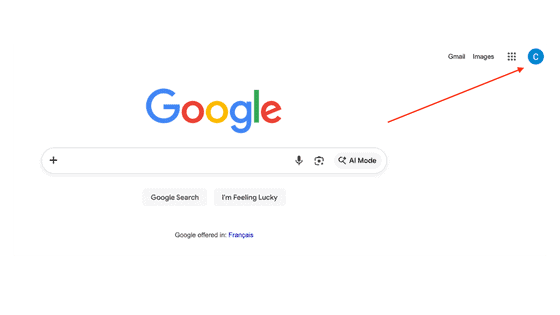
Step 2: Tap Manage your Google Account
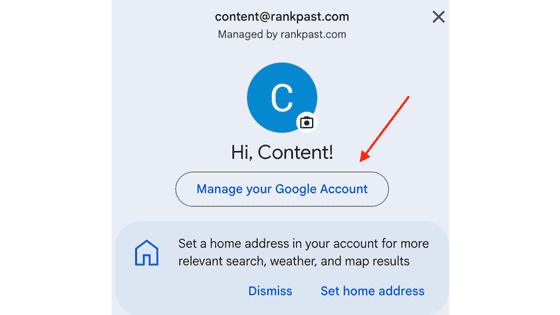
Step 3: On the left-side menu, tap Personal info
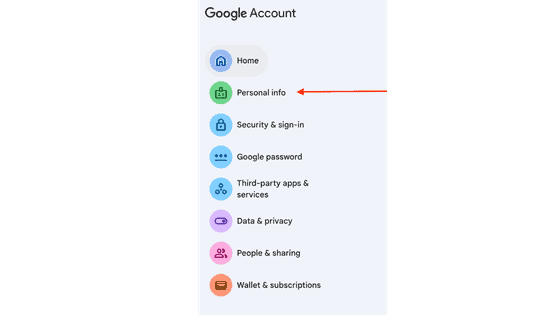
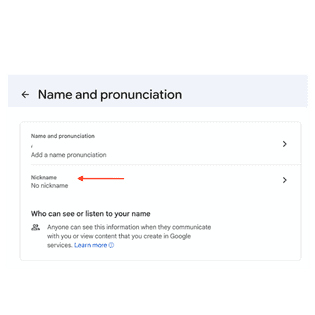
Step 4: Tap Name and pronunciation
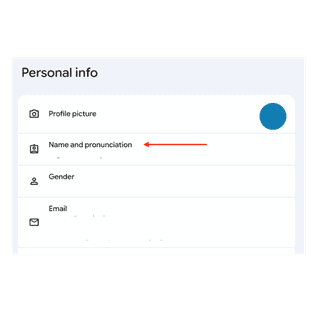
Step 5: Tap Nickname
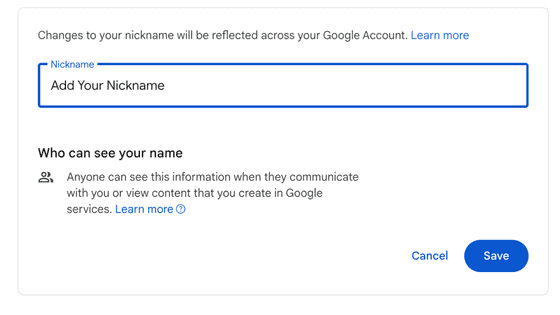
Step 6: Add your nickname and tap Save
Pro Tips Before You Use This Feature
- Choose Your Name Carefully
Pick something that doesn’t reveal your identity and isn’t too unique or recognizable. - Remember, It Applies Everywhere
Your alias will show on reviews, photos, Q&A responses, and edits – past and future. - Not Seeing the Feature Yet?
The feature launched in November 2025 and is now widely available. Try updating your Google Maps app or switching to desktop if you don’t see it yet.
What This Means for Business Owners
If you manage a Google Business Profile, this update matters.
Expect More Reviews
Especially in industries where privacy matters. For Vancouver Island businesses in healthcare, legal services, or counselling, this could meaningfully increase the volume of feedback you receive.
Expect More Honest Feedback
The reduced visibility of identity may lead to more transparency and less filtered opinions. That’s a good thing if you’re delivering great service, and a signal to pay attention to if you’re not.
No Impact on SEO Value
These reviews still count toward rankings and influence local search visibility. Your GBP rating and local map pack position are unaffected by whether reviewers use their real names or aliases.
Final Takeaway
This isn’t about anonymity.
It’s about identity control.
And for businesses that understand how to adapt, it’s an opportunity to build more trust, generate more reviews, and strengthen their online presence.
Frequently Asked Questions
- Can Google see who left an anonymous review?
Yes. Alias reviews are internally linked to the reviewer’s Google account. Google can still identify the reviewer, enforce its policies, and remove reviews that violate guidelines. The alias only hides the name from public view. - Do anonymous reviews count toward my Google Business Profile rating?
Yes, fully. Pseudonymous reviews carry the same ranking weight as real-name reviews. Google evaluates the content, star rating, and reviewer history, not whether a legal name is displayed. - Can I ask customers to leave reviews under an alias?
You can let customers know the option exists, something like “Google now lets you use a custom name if you prefer privacy.” Don’t pressure customers to use it; simply remove the barrier for those who were hesitant. - Can I block or remove alias reviews from my GBP?
You cannot selectively block alias reviews. You can still report any review that violates Google’s content policies. Google’s spam filters and policy enforcement apply equally to both real-name and alias reviews.
Ready to Turn Your Google Business Profile Into a Lead Machine?
At RankPast, we help local business owners build stronger Google Business Profiles, generate more reviews, and rank higher in local search, without the fluff.
We’ve been navigating Google updates since 2008, and our 98% client retention rate reflects what consistent, results-driven local SEO actually looks like.
Ready to make your phone ring? Contact the team at RankPast Digital today, and let’s talk Google Business Profile optimization for your business.